ClassroomFeed Is Up: Time For a Breakdown!
ClassroomFeed Is Up!
So, I finally polished everything to a standard quite far above MVP. I’ll still be working on the reflection system and AI chat features. However, the core functionality is working.
Here’s the the producthunt page: https://www.producthunt.com/products/classroomfeed
And the website itself: https://classroomfeed.com
Here’s a little ad section for you
ClassroomFeed connects to your Google Classroom and sends you a weekly email with an AI-generated summary of:
- Upcoming assignments
- Completed work
- Productivity patterns and streaks
- Motivational prompts to reflect and plan ahead
It’s like a personalized weekly “check-in” powered by GPT, tailored to your school data.
Who is it for?
- Students (especially high school, IB, or AP) who use Google Classroom and feel overwhelmed by scattered due dates
- Parents, counselors, or teachers who want passive insight into student progress
Why I built it
As an IB student, I constantly missed due dates because Google Classroom has no unified weekly view. I built ClassroomFeed to make my academic life less chaotic—and realized it could help others too.
The Design Details
The SaaS was built using my bread and butter react, express but this time I had to split the backend between 2 systems: A Flask running python instance and the express backend.
Architecting this system came with quite a few fascinating design paradigms to consider. I’d say that’s the one of the biggest things I learnt from this.
Tech Stack To Recap
- Frontend: React.js
- Backend: Node.js, MySQL, GPT-5 API
- Auth: Google OAuth (Classroom API) + JWT
- Emails: Mailgun
- Hosting: Vercel, Railway
The primary hurdle was figuring out what backend systems belonged on the Python server and which on the express.js one.
I first split them cleanly.
Express.js Server
- All the backend routes accessable to the frontend
- User authentication
- User data storage (database access)
- Cron job and event triggering
- Account changes
- Storing and creating the OAuth token for each user
Python Server (flask)
- Handled AI (GPT-5) Integration
- Google Classroom ‘scraping’
- All Email Sending
So the lines were pretty clearly drawn. The MySQL database acted as a clear shared ground between the 2 systems.
But then I gave the user the option to trigger an email to be sent, and invite their parents to recieve copies.
Things got more sticky.
If the user requests sends an invitational email to their parents, the express server does the auth, handles rate limiting. But… at some point the express server must inform the python server to send an email.
I considered creating some sort of “send an invite email?” flag in the database that the python server would contiually check for:
[User] ---send invite email>>> [Express Server] -> [DB]
[Python Flask Server] -?> [DB] if so, send email
That could’ve worked but seemed a little too contrived.
Allowing the express server to just handle email sending could’ve worked too. But that was a pain.
So I settled on a little cross-server axios magic I managed to figure out. With the system now implemented, the request from the user gets passed down to the python server.
Note the separation of responsibility:
- The express server validates, generates an invite link, and then forwards those things in a neat request to the python server.
This means the python server could just focus on email sending logic instead of cumbersome validation and database querying.
My Next Hurdles
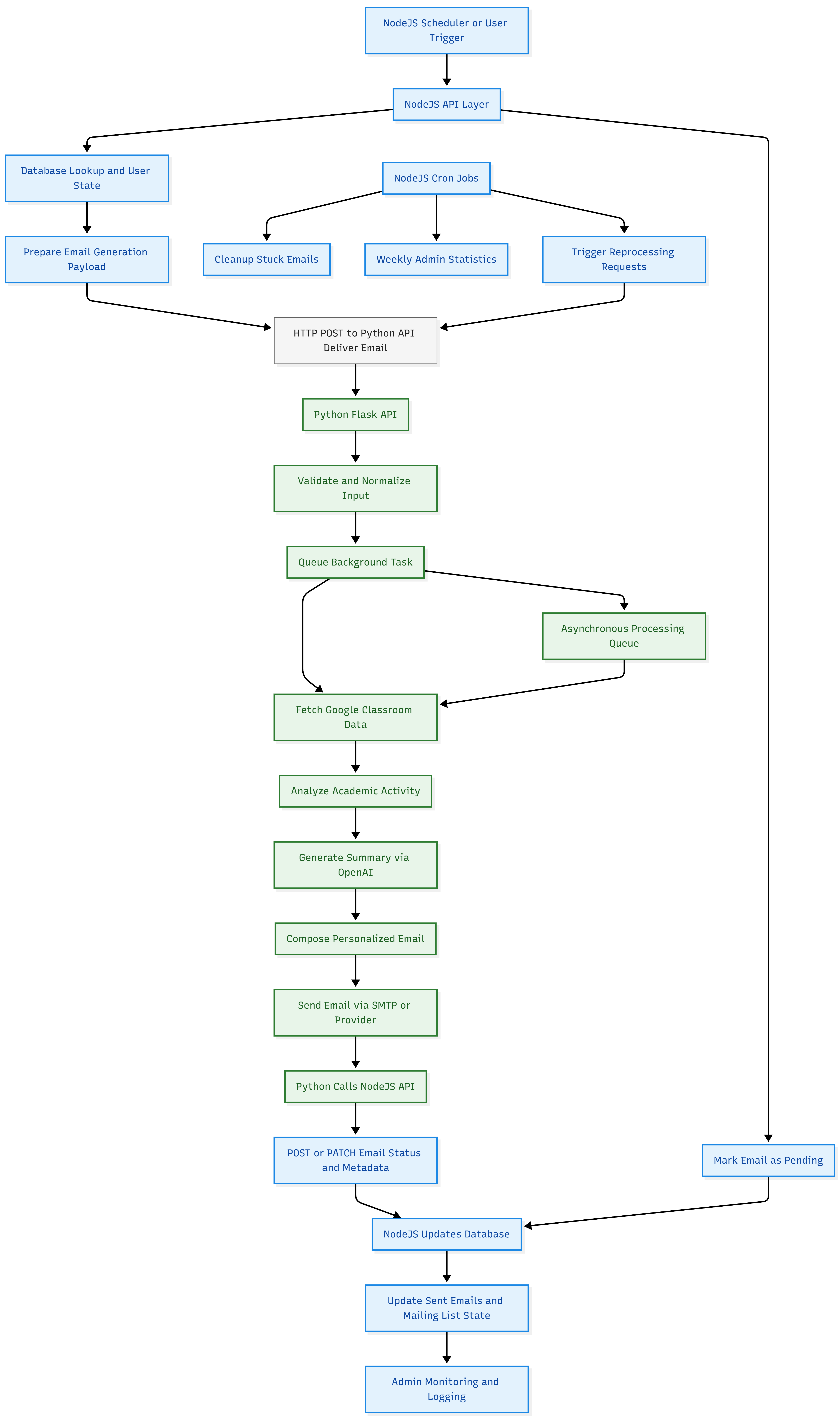
I still tackled the reflection and email sending systems. Let me diagram how they work, and why I arrived on those designs.
From a higher level:
Node.js Scheduler/User Action
⬇︎
Node.js API
- DB lookup
- Prepare POST payload
⬇︎
Python Server (Flask)
- Validate input
- Queue background task
- Fetch/Analyze data
- Generate summary with OpenAI
- Send email
- POST/PATCH result to Node.js (update DB)
⬇︎
Node.js
Update status/record
Admin/email monitoring and error handling
The expressJs server does the queueing through a 15 minute cronJob. If it finds a scheduled email for a user in that 15 minute slot, it dispatches the axios request to the Python server:
cron.schedule('0 9 * * 1', async () => {
  // This function runs on schedule
  const [pendingEmails] = await pool.query(
  "SELECT * FROM users WHERE send_schedule = now ..."
  );

  for email in pendingEmails {
    await axios.post('http://python-server/api/deliver-email', {
        email: ...,
        first_name: ...,
        last_name: ...,
        google_refresh_token: ...,
        // other fields...
    }, {
        headers: { 'X-API-KEY': 'abcxyz' }
    });
  }
});
Then across the fibreglass wires, our Python server recieves:
@require_api_key
def deliver_email():
    # Receives POSTed JSON, validates, then queues background email generation. Perfect nugget of data!
    queue_email_generation(user_data)
where queue_email_generation() may look like:
def queue_email_generation(user_data):
    start_thread(send_weekly_digest(user_data))

async def send_weekly_digest(user_data):
    # 1. Extract fields from user_data
    get recipient email, name, google_refresh_token, preferences, etc.

    # 3. Gather and analyze classroom data
    classroom_report = classroom.scrape(token)

    # 4. Generate email content using AI
    email_body_html = writing_agent.write_email_body(
        # Classroom Data, user prefs, etc. data...
    )

    subject = "ClassroomFeed Weekly Report for {first_name}"

    # 5. Generate reflection questions
    reflection_questions = writing_agent.create_reflection(
        # top secret data
    )
    reflection_url = make_post_request_for_reflection(reflection_questions)

    # 6. Personalize and assemble email content
    # Replace unsubscribe link, reflection URLs, footer, etc. into email_body_html

    # 7. Send the email
    email_client.send_email(
        from, to, subject, email_body_html, cc_emails, etc.
    )

    # 8. Handle copied recipient emails

    # 9. Handle errors and log results

    # 10. Send email content and sending status back to expressJs server.
Note that because email generation takes a long time the express server doesn’t recieve a response to the python/api/deliver-email endpoint after the email is sent to the user.
Instead, the Python server ‘reports’ back after it’s done, and the express server stores the email sent, updates internal states, and marks the email as resolved.
request → acknowledge → async process → callback (once done)
I realized some of this back and forth information hot potato act going on was a little confusing and not the cleanest design pattern, simply because I wanted to stick to that orginal seperation of responsibility. Like I didn’t want the python server to read from database or perform state updates.
I could’ve also built the entire thing in python (or flask), but I was just going off what I was comfortable in coding with. Express.js was my backend go to, and Python was were the AI coding happened - and where I built the first functionality of ClassroomFeed’s AI system.
The Reflection System!
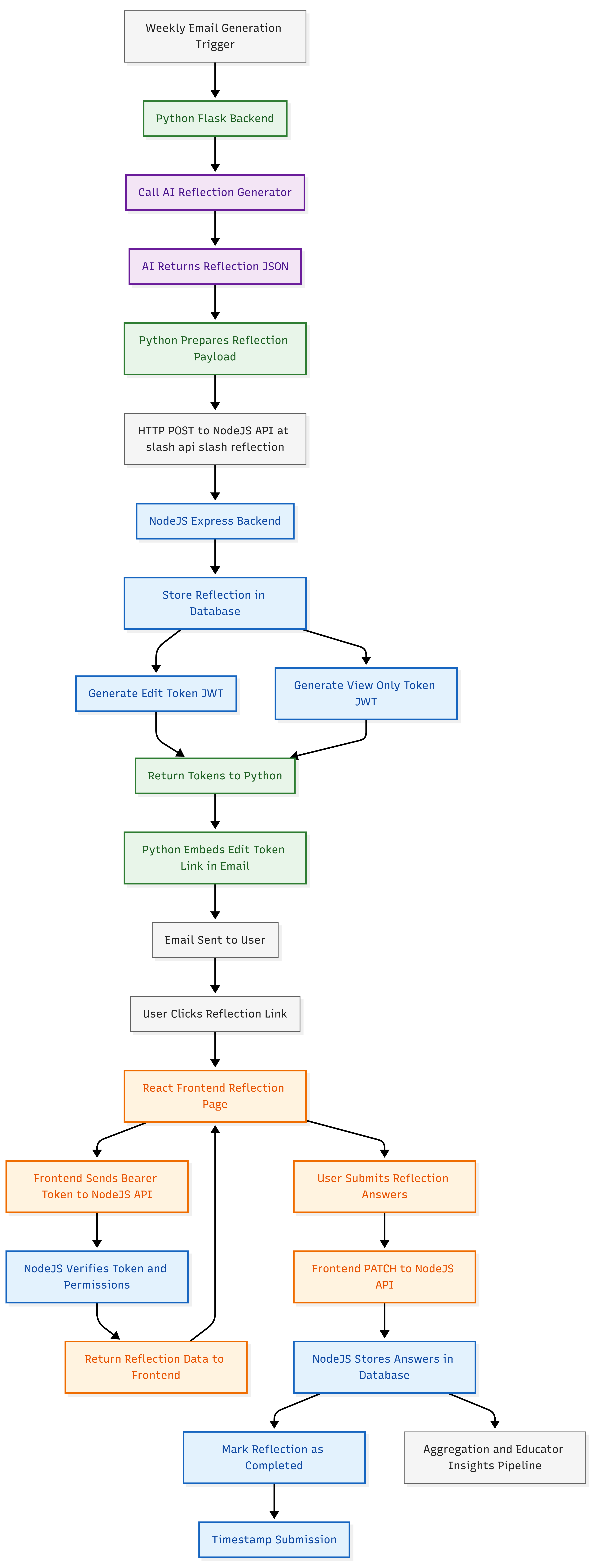
This was a nice little nugget of a system to craft on the side, because I most of the reflection sits nealty inside the email generation system. The halfway through preparing the weekly email, a ‘reflection’ is generated with the python server utils.
Then, as the email needs to contain a URL to access and respond to those reflection links, the python server posts this reflection to the express server. Basically making an instance of a reflection, containing the questions, comments, who its for, etc.
Express server then replies with a URL, which is a link that open to a form where a student can complete this reflection - the “reflection access link”.
Python server then slides that reflection access link into the user’s email before sending it off.
For a moment, can we just acknowledge how cool JWT’s are. I didn’t use them for identity or auth only. They served as links to the reflection lists. Invite links. The magic of cryptography means I don’t need to carry a bunch of extra internal states.
Essentially, I like to think of the reflection system as a little sub process that starts and ends within the wider email generation pipeline:
Spawned during generation
Stored by Express
Injected back into the email
Completed asynchronously by the user (independant)
A Wider View of The Reflection Pipeline
Takeaways!?
So making ClassroomFeed made me really question whether clean separation of responsibility is more valuable than minimal component count, even when it introduces extra inter-service communication.
The answer: I still don’t know. But, databases are not certainly not message queues. I’m glad I didn’t use my database as a messanger or shared state container. In the actual production system, the python server doesn’t even touch the database.
This clear separation of responsibility, may have impacted technical complexity, with the cross-service requests and extra validation checks. Regardless, having the clear responsibility seperation between these services was a more important. And I saved the need to write a lot of boiler plate that would be shared between the python and express servers.
The one thing that wasn’t an issue but could be, and was on my mind, was that if a packet failed or dropped in the cross-service talk, it could lead to a hard failure. I did implement retry logic, but frankly any networking code, with all its retry, and validation checks becomes a little bulky.
In short I’d say:
For:
- Python never needs DB reads
- Python never needs permission logic
- Python becomes a deterministic execution engine
This made it simple.
Strict separation of concerns: Express owns state, identity, and orchestration; Python owns computation and side-effects. No conceptual leakage.
Python becomes a pure execution service: given an input payload, it deterministically produces output and reports results. That is an ideal AI worker model.
Zero persistence coupling in Python: no schemas, migrations, or transactional logic contaminating the AI layer.
Zero security surface area in Python: no authentication, permission hierarchies, or rate limiting logic to maintain.
Express becomes the single source of truth for system state, which prevents split-brain data ownership.
The Python service is stateless and horizontally scalable by default.
Failures become isolatable: AI bugs do not corrupt user state, and DB bugs do not poison AI execution.
The API boundary becomes an explicit contract, which enforces architectural discipline.
AI is treated as a computational primitive, not as an application core.
The system naturally evolves toward event-driven design, even without formal message brokers.
You gain technology freedom: either side can be rewritten, scaled, or replaced independently.
Testing becomes cleaner:
Express tests validate business logic and persistence.
Python tests validate transformation correctness.
Against:
Increased orchestration overhead: every meaningful action now requires cross-service coordination, which multiplies failure modes and debugging complexity.
Higher latency surfaces: even trivial operations become multi-hop HTTP transactions instead of in-process calls.
Harder observability: tracing causality across Express → Python → Express requires structured logging, correlation IDs, and disciplined telemetry.
More infrastructure fragility: two servers means duplicated deployment pipelines, health checks, and version compatibility risks.
Tighter contract coupling: any schema change in request or response payloads must be synchronized between services.
Non-trivial error choreography: partial failures demand compensating actions instead of simple exception handling.
Higher mental load: the system becomes conceptually distributed, even if deployed on a single machine.
Overhead in local development: you now need multiple processes, environment variables, and mocks just to test a single feature.
Closing
Thanks for reading all this way. Seriously. If anything made sense, I’m glad. So here’s this majestic near complete flow chart of the entire core system of ClassroomFeed (It’s still missing a bunch of small features and intracicies).