Technical Report: Implementation of Sand and Water Simulation in java-sand-sim
Implementation of Sand and Water Simulation in XenenDev/java-sand-sim
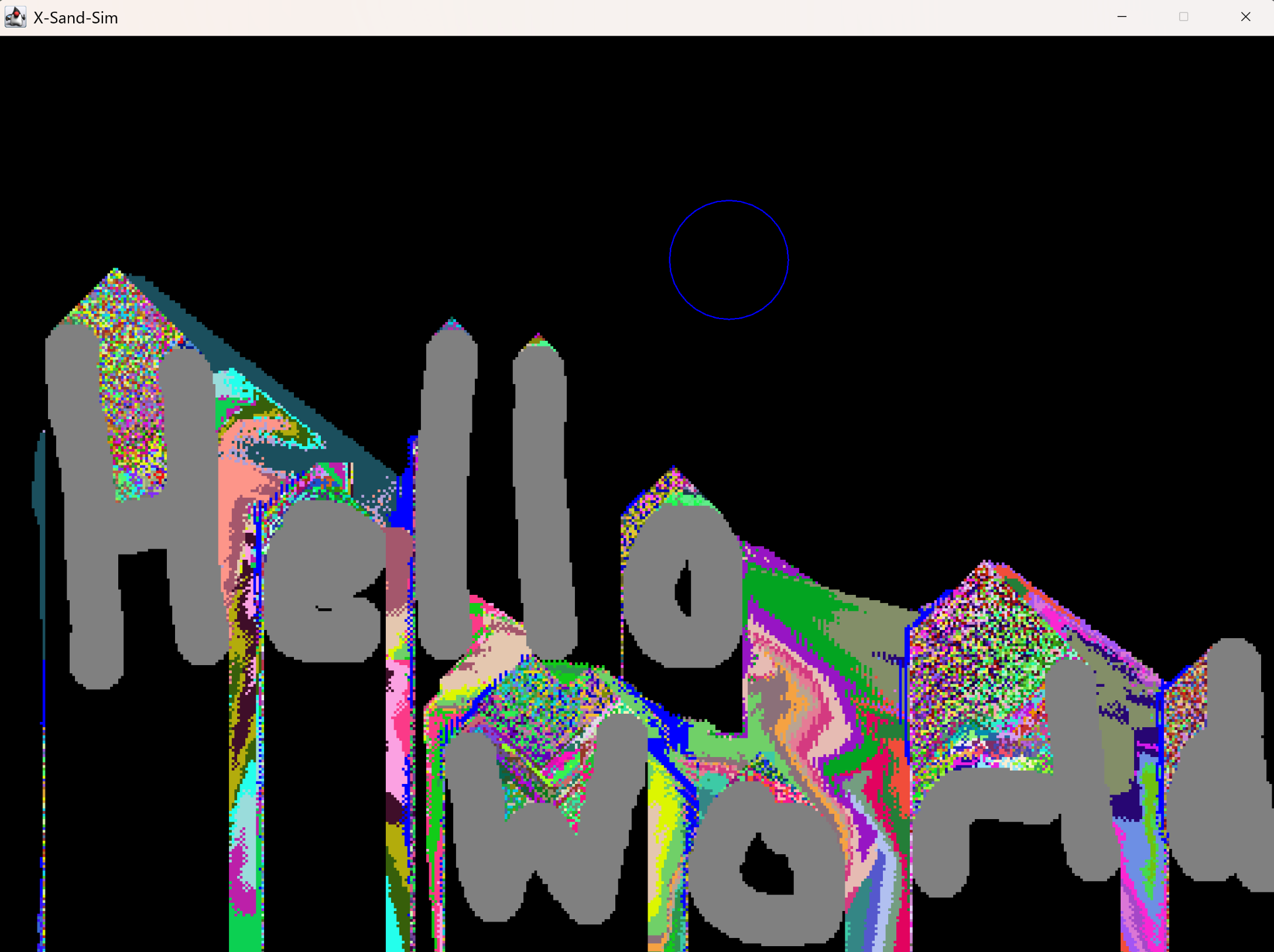
This report analyzes and explains, with sample code, how the sand and water simulation in the java-sand-sim project works. Focus is placed on mechanics such as particle definition, physics, updates, user interaction, and rendering, using representative source code excerpts from the repository.
1. Overall Architecture
The simulation is built around a main loop within GameCore, which delegates the logic of sand and water behavior to a ParticlesManager. Particle types such as Sand, Water, Stone, and Empty are defined for dynamic simulation. The core flow is:
- Main loop manages updates and rendering.
- User input triggers particle placement/removal.
- ParticlesManager updates all particle positions according to simplified physics rules.
2. Particle Representation
Particles are instances of the Particle class. Each particle has a color, a flag indicating if it can fall, movement flags, velocity components, and its type.
// Particle.java
public class Particle {
    public int color;
    public final boolean canFall;
    public boolean isFalling;
    public ParticleType type;
    public float velX, velY;

    public Particle(ParticleType type) { // used for sand, water, etc.
        this.color = type.getColor();
        this.canFall = type.canFall();
        this.isFalling = type.canFall();
        this.type = type;
    }
    // ... isType() etc.
}
Particle types and their physical properties (canFall, color) are defined in an enum:
// ParticleType.java
public enum ParticleType {
    SAND(Color.ORANGE, true),
    STONE(Color.GRAY, false),
    WATER(Color.BLUE, true),
    EMPTY(Color.BLACK, false);

    private final int color;
    private final boolean canFall;
    // ... constructor, getters
}
3. Particle Grid and Manager
A 2D array holds all particles for the simulation field:
// ParticlesManager.java
public class ParticlesManager {
    private final Particle[][] particles;
    private final boolean[][] updated;
    int width, height;

    public ParticlesManager(int width, int height) {
        this.width = width;
        this.height = height;
        particles = new Particle[height][width];
        updated = new boolean[height][width];
        for (int x = 0; x < width; x++) {
            for (int y = 0; y < height; y++) {
                setParticle(x, y, ParticleType.EMPTY);
                updated[y][x] = false;
            }
        }
    }
    // ...
}
4. Main Game Loop
This loop advances the simulation and renders each frame. It ensures updates are tied to real time for smooth physics:
// GameCore.java
public void run() {
    BufferedImage image = new BufferedImage(WIDTH, HEIGHT, BufferedImage.TYPE_INT_RGB);
    int[] pixels = ((DataBufferInt) image.getRaster().getDataBuffer()).getData();
    Window window = new Window("X-Sand-Sim", ...);
    particlesManager = new ParticlesManager(WIDTH, HEIGHT);

    long last = System.nanoTime();
    double delta = 0;
    double UPDATES_PER_SECOND = 1_000_000_000D / 60F;

    while (true) {
        now = System.nanoTime();
        delta += (now - last) / UPDATES_PER_SECOND;
        last = now;

        while (delta >= 1) {
            update(delta);
            delta--;
        }

        render(pixels);
        window.showImage(image, (int) (WIDTH*SCALE), (int) (HEIGHT*SCALE));
        window.renderCursor(...);
        window.show();
    }
}
5. User Interaction
Particles are placed or removed using mouse controls. The manager provides a function to apply changes within a radius at the cursor:
// GameCore.java, update() function
private void update(double delta) {
    particlesManager.update(delta);
    ParticleType type = ParticlesManager.selectedParticle;
    int x = (int) (Input.getX()/SCALE);
    int y = (int) (Input.getY()/SCALE);

    // Left click: place particles
    if (Input.isButtonDown(1)) {
        particlesManager.setParticlesWithinRadius(x, y, type, type == ParticleType.SAND ? 0.1 : 1);
    }
    // Right click: remove particles
    if (Input.isButtonDown(3)) {
        type = ParticleType.EMPTY;
        particlesManager.setParticlesWithinRadius(x, y, type, 1);
    }
}
Particles are placed by randomizing locations within a circular area for natural appearance:
// ParticlesManager.java
public void setParticlesWithinRadius(int centerX, int centerY, ParticleType type, double density) {
    Random random = new Random();
    Color randomColor = new Color(random.nextInt(256), random.nextInt(256), random.nextInt(256));
    for (int x = 0; x < width; x++) {
        for (int y = 0; y < height; y++) {
            if ((centerX - x)*(centerX - x) + (centerY - y)*(centerY - y) < placementRadius*placementRadius) {
                Particle p = new Particle(type);
                if (p.isType(ParticleType.SAND) || p.isType(ParticleType.WATER)) p.color = randomColor.getRGB();
                if (Math.random() > 1d - density) particles[y][x] = p;
            }
        }
    }
}
6. Simulation Physics: Update and Gravity
Each simulation step consists of updating particle positions. For those that can “fall” (sand, water), simplified gravity and basic collision rules are applied. The main update traverses the grid:
// ParticlesManager.java
public void update(double delta) {
    handleInputs();
    for (int y = height - 1; y >= 0; y--) {
        for (int x = 0; x < width; x++) {
            if (updated[y][x]) continue;
            Particle p = getParticle(x, y);
            if (p.canFall) handleGravity(p, x, y, delta);
        }
    }
    // reset all updated flags
    for (int x = 0; x < width; x++)
        for (int y = 0; y < height; y++)
            setUpdated(x, y, false);
}
6.1. Gravity and Particle Exchange Logic
Here’s the heart of the sand and water mechanic. Sand and water “fall” if the cell below is empty; otherwise, they try to move diagonally down or horizontally to simulate fluidity and piling up.
// ParticlesManager.java, inside handleGravity()
Particle under = getParticle(x, y + 1);
boolean isFalling = under.isType(ParticleType.EMPTY);
if (isFalling) {
    setParticle(x, y, ParticleType.EMPTY);
    setUpdated(x, y, true);
    setParticle(x, y + 1, p);
    setUpdated(x, y + 1, true);
} else if (getParticle(x - 1, y + 1).isType(ParticleType.EMPTY)) {
    setParticle(x, y, ParticleType.EMPTY);
    setUpdated(x, y, true);
    setParticle(x - 1, y + 1, p);
    setUpdated(x - 1, y + 1, true);
} else if (getParticle(x + 1, y + 1).isType(ParticleType.EMPTY)) {
    setParticle(x, y, ParticleType.EMPTY);
    setUpdated(x, y, true);
    setParticle(x + 1, y + 1, p);
    setUpdated(x + 1, y + 1, true);
// Water may also swap with sand, adding fluid simulation flavor:
} else if (p.isType(ParticleType.WATER)) {
    if (getParticle(x - 1, y).isType(ParticleType.EMPTY)) {
        setParticle(x, y, ParticleType.EMPTY);
        setUpdated(x, y, true);
        setParticle(x - 1, y, p);
        setUpdated(x - 1, y, true);
    } else if (getParticle(x + 1, y).isType(ParticleType.EMPTY)) {
        setParticle(x, y, ParticleType.EMPTY);
        setUpdated(x, y, true);
        setParticle(x + 1, y, p);
        setUpdated(x + 1, y, true);
    } else {
        p.isFalling = false;
    }
}
7. Rendering
Each tick, colors from the grid are copied straight to a buffered image, which is then displayed. This enables highly efficient visualization with direct memory access.
private void render(int[] pixels) {
    for (int y = 0; y < HEIGHT; y++) {
        for (int x = 0; x < WIDTH; x++) {
            pixels[y * WIDTH + x] = particlesManager.getParticle(x, y).color;
        }
    }
}